Who can see what
in your business?
A login is not enough. Here is a plain-English guide to making sure each person sees only what they should, for medical practices, law firms, franchises and financial firms.
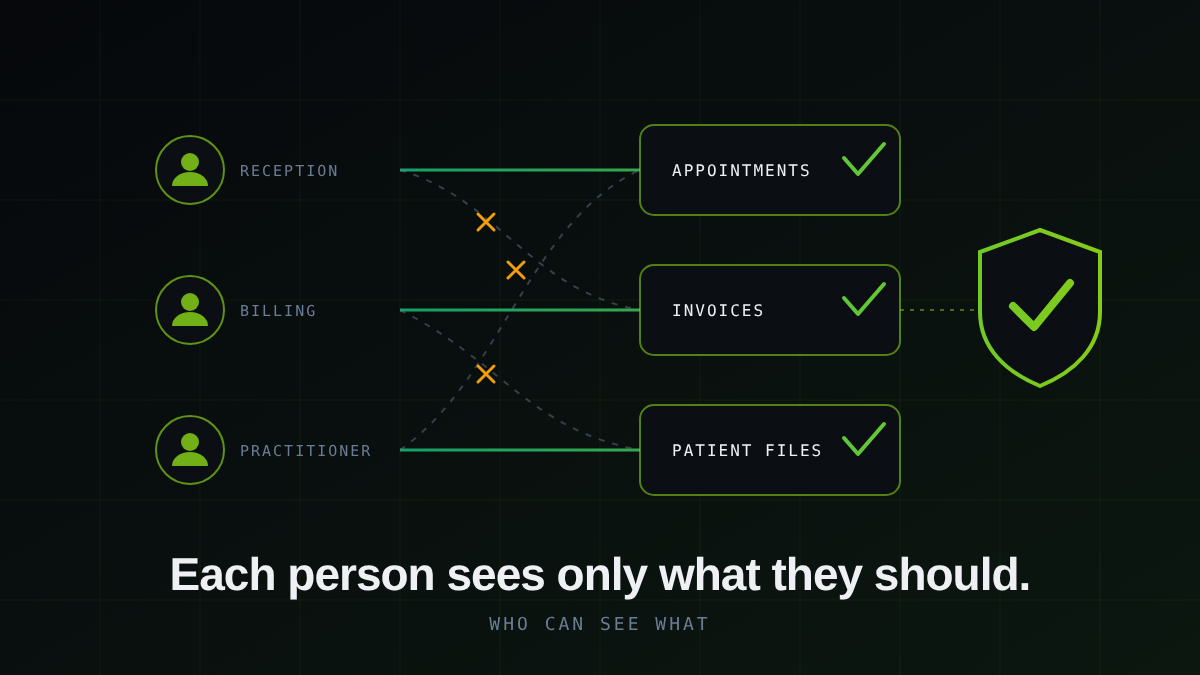
Who should be able to see what in your business system? Each person should see only what their job needs, and every change should be written down. A login on its own does not do that. A login only proves who someone is. It says nothing about what they are allowed to open once they are inside.
// Chapter 01 — The problemA login is a front door, not a set of locked rooms
Most business systems start small. A few staff, one login each, and everyone trusts everyone. Then the business grows. A second branch opens. A bookkeeper joins. A new client needs a portal. Nobody stops to ask what each of those people can now see.
Usually the answer is: more than they should. Nobody means any harm. It is simply that access was handed out one request at a time, and nobody went back to tidy it up. The risk is not a villain. It is an ordinary mistake, such as a franchisee opening the wrong branch's numbers, or a former employee who still has a working password.
Four simple parts
Proper access control is not complicated to understand. Think of an office building.
Any business that holds other people's information
Medical practices hold patient records. Reception, practitioners and billing should each see what they need and nothing more. Law firms hold confidential client files, and each matter should only be open to the people working on it. Franchise networks should let each franchisee see their own branch while head office sees the whole picture. Financial firms and bookkeepers hold one client's numbers next to another's, and those should never mix.
The details change from business to business. The question is always the same: who can see what, and can you prove it?
- Anyone logged in may see too much
- The rules live in people's heads
- Nobody can say who looked at what
- People who left may still have access
- Each person sees only their own part
- The rules are built into the system
- Every change is recorded
- Access is removed in one step
Built in from the start, not added later
The safest way to do this is to build it into the system from day one. That means the system itself refuses to show information to the wrong person, so it does not depend on someone remembering to switch a setting on. It also means the rules are written down in one place, so you can see them and change them.
Forge Vertical builds these systems on established cloud infrastructure, including Google Cloud, Firebase and Cloudflare. Our own marketplace, TripSpace Global, runs on this approach. Partners are individually approved, each sees only their own dashboard, and payment details are kept in a locked, separate place.
You do not have to work it out alone
You know your business. You do not need to know the technical side. Tell us how your business runs and who needs to see what, and we will show you, in plain language, what the access should look like and what it would take to build. You decide once you have seen it. If it is not right for you, you will still know what good looks like.
What does 'who can see what' mean for a business?
It means each person who logs in can only see the information their job needs. A franchisee sees their own branch, a receptionist does not see billing, and a client sees only their own documents. Every change is recorded, so you can see who did what and when.
Is a password enough to protect business data?
No. A password only proves who someone is. It does not decide what they can see once they are inside, and it does not record what they do. You also need permissions for each person and a record of activity.
Is this relevant for medical practices and law firms?
Yes. Both hold highly sensitive records. Each person should see only what their role requires, and there should be a record of who opened what. Check with your professional body about any extra rules that apply to you.
Does this help with POPIA?
It helps. POPIA expects organisations to take reasonable steps to protect personal information, and controlling and recording access is one of those steps. It is not a guarantee of compliance, and you should ask your attorney what applies to your business.
How do I get started?
Get in touch by WhatsApp, email or the free quote form. Tell us how your business runs and who needs to see what. We will show you in plain language what the access should look like and what it would take to build, and you decide after that.